
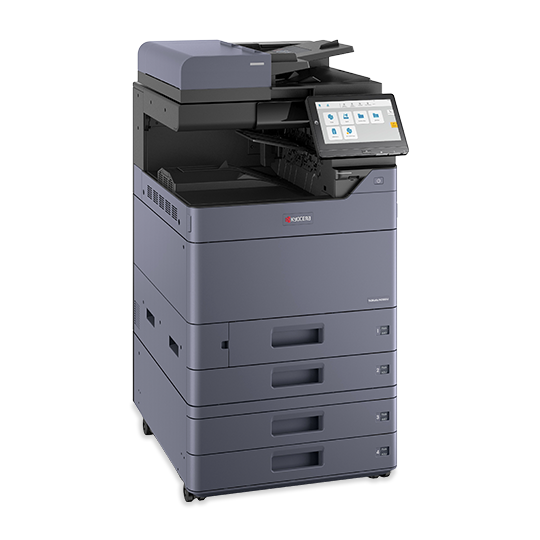

The Kyocera TASKalfa MZ3501ci is an A3 colour multifunction copier that prints, copies and scans at 35 pages per minute. It suits busy offices, schools and university print rooms producing colour documents up to SRA3. Additionally, it expands with document feeders, finishers and extra paper trays as volumes grow.
Key Features & Benefits
- 35 ppm in colour and black, 17 ppm on A3: Large colour jobs finish about 40% faster than on the 25 ppm MZ2501ci. As a result, queues stay short during peak hours.
- Fast first page: 5.9 seconds black: Single-page jobs such as receipts, letters and forms come out almost immediately. Therefore, walk-up users spend less time waiting at the machine.
- 1,150-sheet standard input, expandable to 7,150 sheets: Two 500-sheet cassettes plus a 150-sheet bypass tray keep several paper types loaded. Optional feeders support large print runs without reloading.
- 10.1-inch tilting colour touchscreen: The swivel panel works like a tablet and adjusts for standing or seated users. Meanwhile, common jobs can be saved as one-touch shortcuts.
- Cloud-ready scanning with built-in security: Scan to email, folders, USB or cloud services, and release confidential prints with a PIN or card. For instance, exam papers and payslips stay private until collected.
Technical Specifications
Print & Copy Performance
- Functions: Print, copy, scan (fax optional)
- Print speed: Up to 35 ppm A4 (colour and black); up to 17 ppm A3
- Duplex speed: 35 ppm A4 – no slowdown on two-sided jobs
- First print out: 5.9 sec black / 7.7 sec colour
- First copy out: About 5.3 sec black / 7.0 sec colour (from the glass)
- Warm-up time: 18 seconds or less
- Print resolution: 1200 x 1200 dpi; up to 4800 x 1200 dpi equivalent
- Copy features: 1–9,999 copies; zoom 25–400%; ID copy; booklet copy; 2-in-1, 4-in-1 and 8-in-1
Controller & Interface
- Processor: ARM Cortex-A53 quad-core, 1.6 GHz
- Memory: 4 GB RAM + 64 GB SSD (optional 320 GB or 1 TB HDD)
- Display: 10.1-inch (256.5 mm) colour touchscreen, tilts 15° – 90°
- Platform: HyPAS for adding business apps
Connectivity
- Wired: Gigabit Ethernet (10/100/1000BaseT); USB 3.0; 4 x USB host ports
- Wireless: Optional Wi-Fi 802.11a/b/g/n/ac (requires IB-37 or IB-51 kit)
- Mobile printing: AirPrint, Mopria, NFC, KYOCERA Mobile Print app, Wi-Fi Direct (optional)
- Cloud printing: Microsoft Universal Print support
Paper Handling
- Standard input: 2 x 500-sheet cassettes + 150-sheet multipurpose tray (1,150 sheets)
- Maximum input: 7,150 sheets with optional feeders
- Cassette sizes: Upper A6R – A4R; lower A6R – SRA3
- Bypass tray: A6R – SRA3 (320 x 450 mm); banners up to 1,220 mm
- Paper weight: 52 – 300 g/m² – handles heavy card
- Duplex: Standard, 60 – 256 g/m², A6R – SRA3
- Output: 500 sheets standard; up to 5,000 sheets with finishers
Scanning (Requires an Optional Document Processor)
- Scan speed: Up to 200 ipm duplex (A4, 300 dpi, with DP-7160/7170)
- Scan resolution: 600, 400, 300, 200 dpi (1200 dpi via TWAIN/WIA)
- Destinations: Email, SMB folder, FTP, USB drive, document box, network TWAIN, WSD
- File formats: PDF, PDF/A, encrypted PDF, high-compression PDF, TIFF, JPEG, XPS
- Optional: Searchable PDF and Word/Excel/PowerPoint output (Scan Extension Kit)
Fax (Optional – Fax System 14)
- Standard: Super G3, 33.6 kbps
- Transmission: Less than 3 seconds per page (JBIG)
- Features: Network fax, encrypted transmission, broadcast, fax forwarding to email
Supported Systems
- Windows: All current versions, including Windows 10 and 11
- macOS: Mac OS X 10.9 or later
- Others: Linux, Unix, ChromeOS
- Print languages: PCL6, KPDL3 (PostScript 3 compatible), PDF Direct Print, XPS/OpenXPS
Security
- Secure print with PIN release
- User authentication (card reader optional)
- Encrypted PDF output; SSL, IPsec, SNMPv3
- LDAP and IP filtering
- Confidential Document Guard for copies
Consumables (Average Yield at 5% Coverage)
- Black toner: About 25,000 pages
- Cyan, magenta, yellow toner: About 12,000 pages each
- Waste toner box (WT-8500): About 40,000 pages
- Toner code: Shared with the MZ2501ci; varies by region (TK-8455, TK-8459, TK-8450 or TK-8467)
Power & Environment
- Power source: 220 – 240 VAC, 50/60 Hz
- Power use: 590 W printing; 40 W ready; 0.5 W sleep
Dimensions & Weight
- Main unit (W x D x H): 602 x 665 x 790 mm
- Weight: About 90 kg – floor or cabinet placement, not desktop
Key Optional Accessories
- Document processors: DP-7140 (50-sheet), DP-7150 (140-sheet), DP-7160/7170 (320-sheet single-pass)
- Paper feeders: PF-7140 (2 x 500 sheets); PF-7150 (2 x 1,500 sheets); PF-7120 side deck (3,000 sheets)
- Finishers: DF-7100 inner finisher (500 sheets, 50-sheet stapling); DF-7120 and DF-7140 with punch and booklet options
- Others: Fax System 14, wireless LAN kit, HDD, card reader, cabinet
Use Cases & Applications
Medium-Sized Offices and Departments
Teams of around 15–30 users can share the TASKalfa MZ3501ci for colour proposals, invoices and A3 reports. Additionally, scan-to-folder replaces manual filing of signed documents.
Universities, Colleges and Schools
Exam offices and departments print colour handouts and A3 timetables in large batches. Secure print keeps exam papers private until the lecturer collects them.
Campus Print Rooms and Cyber Cafés
At 35 ppm, student queues for assignments, project covers and posters move faster. The 300 g/m² support also covers certificates and business cards on SRA3 sheets.
Marketing, Real Estate and Design Teams
Teams print colour flyers, brochures and property listings in-house. Meanwhile, SRA3 output allows full-bleed A3 prints after trimming.
Professional Firms (Legal, Accounting, Healthcare Admin)
A 320-sheet single-pass feeder digitises large case files quickly. Encrypted PDFs protect client records.
Will It Work With Your Setup?
What is the difference between the TASKalfa MZ3501ci and MZ2501ci?
Both share the same body, panel, paper handling and options. The MZ3501ci prints at 35 ppm instead of 25 ppm and has a faster first page. It suits higher monthly volumes.
Does the Kyocera TASKalfa MZ3501ci come with an automatic document feeder?
Usually not. The base unit ships without a document processor or platen cover. You need a DP-7140, DP-7150, DP-7160 or DP-7170 for batch scanning and copying.
Does it have Wi-Fi?
Not as standard. It connects by Gigabit Ethernet, and Wi-Fi is available through an optional kit.
Can it fax?
Only with the optional Fax System 14 and an analogue phone line.
Is it compatible with Windows 11 and Mac?
Yes. It supports current Windows versions, macOS 10.9 and later, Linux and ChromeOS.
Can it print on thick card and SRA3?
Yes. It handles paper up to 300 g/m² and SRA3 (320 x 450 mm) from the bypass tray and lower cassette.
How long does the toner last?
Black toner lasts about 25,000 pages, and each colour lasts about 12,000 pages at 5% coverage.
Is it suitable for a home office or single student?
No. At about 90 kg and floor-standing size, it is designed for shared workgroups and print rooms.
Important Notes (Merchant Verification Before Publishing)
- Bundle contents: Confirm whether the unit ships with a document processor, platen cover, cabinet or Fax System. The base unit includes none of these.
- Model configuration: Some regions supply the MZ3501ci as an MZ2501ci base with a UG-52 speed licence. Confirm the unit runs at 35 ppm as listed.
- Toner code: Confirm the regional toner series for Kenyan units (TK-8455, TK-8459, TK-8450 or TK-8467).
- Starter toner: Confirm the yield of the toner supplied in the box.
- Wi-Fi: Confirm whether a wireless kit is included; it is optional by default.
- Warranty and service: Confirm warranty length, on-site service terms and installation by a technician.
- Delivery: At about 90 kg, confirm delivery and installation arrangements.
Available at Novelty Technologies Solutions




Reviews
There are no reviews yet.