
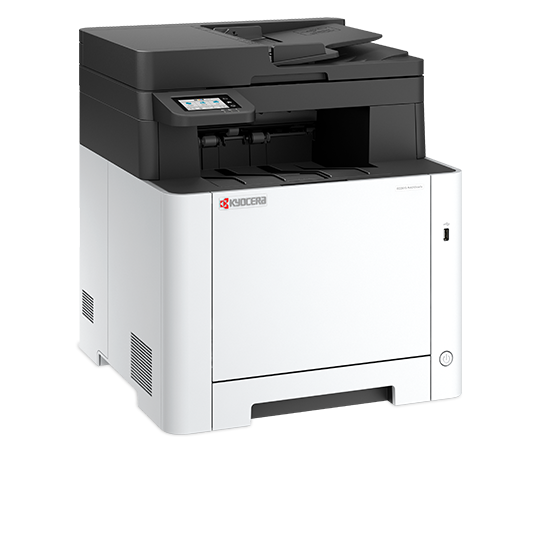

The Kyocera ECOSYS MA2101cwfx is an A4 colour laser multifunction printer that prints, copies, scans and faxes. It uses Kyocera’s long-life drum and developer design, so you replace only the toner during routine use. It suits small offices, home workspaces and schools that need crisp colour documents and reliable network printing.
Key Features & Benefits
- 21 ppm colour and mono laser printing: Black and colour pages print at the same speed, with the first page out in about 11 seconds. As a result, colour reports and invoices don’t hold up the queue.
- Long-life ECOSYS components: The drum and developer are built to last, so routine maintenance is mainly a toner swap. Consequently, there are fewer parts to buy and less downtime.
- Automatic duplex printing: The MA2101cwfx prints both sides of the page automatically. Therefore, long reports and handouts use half the paper.
- Gigabit Ethernet, dual-band Wi-Fi and Wi-Fi Direct: Connect to a wired office network or 2.4/5 GHz Wi-Fi. Additionally, phones print directly via AirPrint, Mopria or the KYOCERA Mobile Print app.
- Built-in business security: Secure Boot, TLS 1.3, user authentication and encrypted PDF support protect sensitive documents. For instance, an accounts team can restrict printing to signed-in users.
Technical Specifications
Printing
- Print technology: Colour laser (ECOSYS)
- Print speed: Up to 21 ppm A4 colour and mono (22 ppm Letter); up to 11 ppm duplex
- First page out time: About 11 seconds mono / 12.5 seconds colour
- Warm-up time: About 32 seconds from power on
- Resolution: 1200 x 1200 dpi
- Duplex printing: Automatic (A4, A5, 60-120 g/m²)
- Printer languages: PRESCRIBE, PCL 6 (5c, XL), KPDL3 (PostScript 3 compatible), PDF/XPS/TIFF direct print
- Recommended monthly volume: Up to 2,000 pages (maximum 65,000 pages per month)
- Device lifetime: 100,000 pages or 5 years, according to Kyocera
- Borderless printing: Not supported
Copying
- First copy out time: About 10/12 seconds mono/colour from the glass
- Copy range: 1-999 copies, 25-400% zoom in 1% steps
- Features: Duplex copying, 2-in-1 and 4-in-1, ID card copy, electronic sorting, EcoPrint toner saving
- Maximum original size: A4/Legal
Scanning
- Scan speed (single-sided): 27 ipm mono / 22 ipm colour (300 dpi, A4)
- Scan resolution: Up to 1200 dpi (TWAIN/WIA)
- Scan destinations: Email, FTP, SMB folder, USB drive, PC (TWAIN, WIA, WSD), cloud via Kyocera Cloud Access
- File formats: PDF, PDF/A, high-compression PDF, encrypted PDF, JPEG, TIFF, XPS
Fax
- Compatibility: Super G3, up to 33.6 kbps
- Transmission speed: About 3 seconds per page
- Address book: 300 entries
- Memory reception: At least 256 pages
- Functions: Network fax (PC fax), fax forwarding, delayed send, duplex reception
Paper Handling
- Standard input: 250-sheet cassette (60-163 g/m²) + 50-sheet multipurpose tray (60-220 g/m²) – 300 sheets total
- Maximum input: 550 sheets with the optional PF-5110 cassette
- Automatic document feeder: 50 sheets, single-sided, 60-90 g/m²
- Output tray: 150 sheets face down, with tray-full sensor
- Paper sizes: A4, A5, A6, Legal, custom sizes up to 216 x 356 mm
Consumables (Europe/EMEA codes)
- Starter toner (in the box): Black, Cyan, Magenta and Yellow for about 1,500 A4 pages each
- TK-5480 toner kits: 1,250 pages per colour
- TK-5490 high-yield toner kits: 2,800 pages black / 2,400 pages per colour
- Yield standard: ISO/IEC 19798
Connectivity & Compatibility
- Interfaces: Hi-Speed USB 2.0, Gigabit Ethernet (10/100/1000BASE-T), Wi-Fi 802.11a/b/g/n/ac (2.4/5 GHz), Wi-Fi Direct, USB host, SD/SDHC slot (optional card)
- Mobile printing: KYOCERA Mobile Print (iOS/Android), Apple AirPrint, Mopria, Microsoft Universal Print
- Operating systems: All current Windows versions, macOS 10.9 or later, Chrome OS
- Security: Secure Boot, TLS 1.3, IPsec, HTTPS, SNMPv3, user and network authentication, IP filtering, optional TPM (UG-51)
- Cost centre management: 20 departments
Control & Hardware
- Display: 6.8 cm (2.7″) colour touchscreen
- Processor: ARM Cortex-A53, 1.0 GHz
- Memory: 1 GB
Power & Physical
- Power consumption: 345 W printing, 41 W ready, 0.4 W sleep
- Power supply: AC 220-240 V, 50/60 Hz
- Noise level: 63.1 dB(A) printing, 48 dB(A) quiet mode
- Dimensions (W x D x H): 410 x 416 x 457 mm
- Weight: About 26 kg – needs a sturdy desk or stand
In the Box
- Printer, starter toner (Black, Cyan, Magenta, Yellow), quick guide, safety information, power cable
- Drivers and manuals are downloaded online (no driver DVD included)
Who Is the Kyocera ECOSYS MA2101cwfx Ideal For?
Schools, Colleges & Students
- Printing colour handouts, charts, project reports and posters for presentations
- Scanning certificates, transcripts and application documents straight to email
- Supporting a school office or department with print, scan and fax in one machine
- Serving postgraduate offices or student-run businesses that need sharp, smudge-free output
Small Businesses & Home Offices
- Printing colour invoices, quotations, proposals and branded letterheads
- Sending and receiving faxes for banks, insurers and government offices that still use them
- Scanning contracts and receipts to a shared folder or cloud storage
- Sharing one secure networked printer across a small team of 3-10 users
Will the Kyocera MA2101cwfx Work With Your Setup?
Does it work on a wired or wireless network? Yes. It has Gigabit Ethernet and dual-band Wi-Fi (2.4 and 5 GHz). Wi-Fi Direct also lets phones connect without a router.
Can I print from my phone? Yes. It supports Apple AirPrint, Mopria and the KYOCERA Mobile Print app for iOS and Android.
Does the ADF scan both sides automatically? No. The 50-sheet ADF is single-sided. Two-sided originals need to be reloaded to scan the reverse side. However, printing and copying output can be two-sided.
How long does the toner last? The starter toner prints about 1,500 pages per colour. Standard replacement cartridges print 1,250 pages, and high-yield cartridges print 2,400-2,800 pages.
How does it compare to an ink tank printer? An ink tank printer such as the Epson EcoTank L6370 usually costs less per page. In contrast, the MA2101cwfx gives laser-sharp text, faster scanning, fax and stronger network security. It suits offices that value reliability and security over the lowest running cost.
Does it need a phone line for fax? Yes. Fax needs an analogue telephone line. Without one, scan-to-email and network folders handle most document sending.
Important Notes
- Toner codes vary by region: Europe uses TK-5480/TK-5490, Australia uses TK-5484/TK-5494 and the US uses TK-5482/TK-5492. Confirm the codes for Kenyan stock before publishing.
- Toner yields follow ISO/IEC 19798 and vary with page coverage and settings.
- The 3-year/100,000-page drum and developer warranty is a European offer. Kenyan warranty terms may differ.
- Specifications come from Kyocera’s European datasheet (September 2026) and Kyocera USA’s spec guide.
Items to Confirm Before Publishing
- Kenyan unit part number (EU version: 110C223NL0)
- Toner codes and yields for Kenyan stock
- Starter toner yield in the box (EU: about 1,500 pages per colour)
- Warranty period and drum/developer warranty terms in Kenya
- USB cable and telephone cable inclusion (not listed in box contents)
- Optional PF-5110 cassette availability locally
Available at Novelty Technologies Solutions





Reviews
There are no reviews yet.