
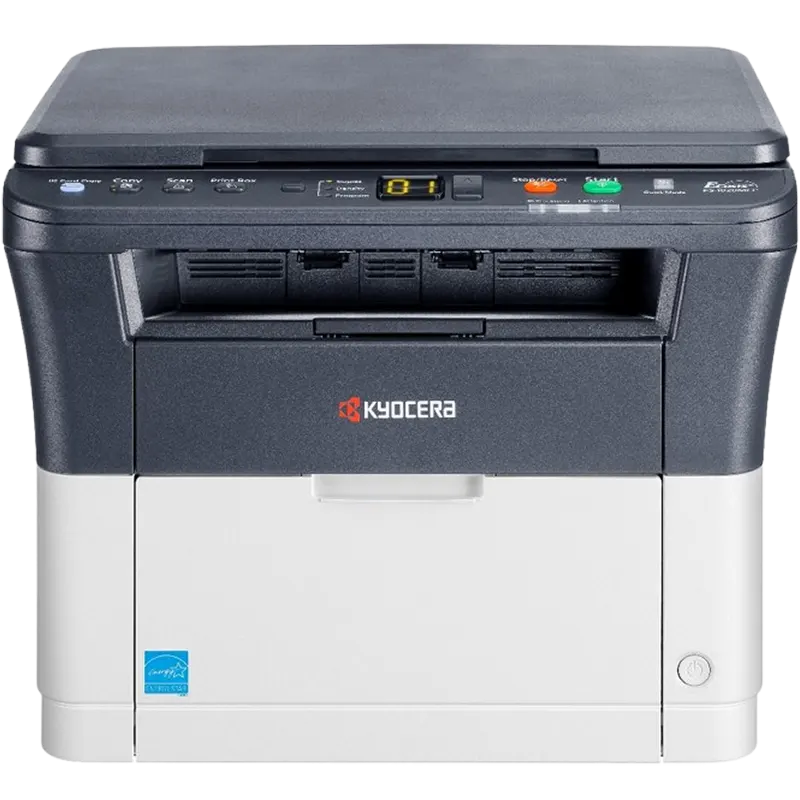

The Kyocera ECOSYS FS-1025MFP is a compact 3-in-1 monochrome laser printer that prints, copies and scans in colour. It handles everyday A4 documents at up to 25 pages per minute, with automatic double-sided printing built in. It suits small offices, shared workstations, cyber cafés and students who print notes, assignments and projects regularly.
Key Features & Benefits
- Automatic duplex printing: Prints on both sides without flipping pages by hand. As a result, you use up to half the paper on long reports and handouts.
- 25 pages per minute output: A 20-page assignment or invoice batch finishes in under a minute. Additionally, the first page arrives in about 7.5 seconds.
- 40-sheet automatic document feeder (ADF): Load a multi-page contract or exam paper and copy or scan it in one go. You no longer feed sheets one at a time.
- Long-life ECOSYS components: The drum is designed to outlast many toner changes, so you replace only the toner. Consequently, running costs per page stay low and predictable.
- 3,000-page toner cartridge: One TK-1120 cartridge covers roughly 6 reams of A4 at standard coverage. For instance, a small office printing 150 pages a week changes toner about every 4–5 months.
Technical Specifications
General
- Functions: Print, copy, colour scan
- Print technology: KYOCERA ECOSYS monochrome laser
- Control panel: 2-line LCD display
- Memory: 64 MB (standard and maximum)
- Recommended duty cycle: Up to 20,000 pages per month (maximum)
Print Performance
- Print speed: Up to 25 ppm (A4); up to 26 ppm (Letter)
- First print out: Approx. 7.5 seconds
- Warm-up time: 23 seconds or less from power on
- Resolution: 600 x 600 dpi; Fast 1200 mode (1800 x 600 dpi) for sharper text
- Duplex: Automatic, standard — 60–120 g/m² paper; A4, Letter, Legal
Copy
- First copy out: Approx. 11 seconds
- Copy resolution: 600 x 600 dpi
- Zoom: 25–400%, plus preset reduction and enlargement ratios
- Duplex copy: Supported via the ADF and duplex unit
Scan
- Scan type: Colour and monochrome
- Scan resolution: Up to 600 dpi
- Scan method: Scan-to-PC via TWAIN/WIA over USB connection
Paper Handling
- Input: 250-sheet cassette + 1-sheet manual feed tray (251 sheets total)
- Paper sizes: A4, A5, A6, B5, Letter, Legal, custom (70 x 148 mm to 216 x 356 mm)
- Paper weight: 60–220 g/m² (cassette and manual tray) — handles light cardstock and labels
- Output tray: 100 sheets, face-down
- Document feeder (ADF): 40 sheets, up to 216 x 356 mm (Legal)
Connectivity & Compatibility
- Interface: Hi-Speed USB 2.0; 10/100Base-TX Ethernet (see Important Notes)
- Operating systems: Microsoft Windows (XP, Vista, 7 and later with current drivers), Windows Server; macOS supported for printing only
- Print language: Host-based (GDI)
Consumables
- Toner: TK-1120 — up to 3,000 A4 pages (ISO/IEC 19752)
- Starter toner (in box): Approx. 1,000 pages
- Drum unit: DK-1110 long-life drum — approx. 100,000 pages
Physical
- Dimensions (W x D x H): 390 x 361 x 362 mm — fits on a standard office desk or side table
- Weight: Approx. 10.0 kg
- Power: 220–240 V, 50/60 Hz
Who Is the Kyocera FS-1025MFP For?
Students and Campus Use
- Printing lecture notes, research papers and project drafts double-sided to save paper
- Copying and scanning handouts, past papers and ID documents for applications
- Shared hostel rooms or study groups splitting toner costs
Small Offices and Business Use
- Invoices, quotations, delivery notes and receipts in daily volumes
- Scanning signed contracts and KRA or bank documents to PC for filing
- Reception or front-desk use where one compact machine replaces a separate printer and copier
Cyber Cafés and Print Shops
- Steady document printing and photocopying with a low cost per page
- The 20,000-page monthly maximum duty cycle handles busy weeks without strain
Frequently Asked Questions
Does the FS-1025MFP print in colour?
No. It prints and copies in black and white only. However, the scanner captures colour, which is useful for scanning certificates and IDs.
Does it support Wi-Fi or mobile printing?
No. There is no built-in Wi-Fi, AirPrint or Mopria support. Connect it by USB cable, or via Ethernet to share it across an office network.
Will it work with my Mac?
Yes, for printing. However, scanning relies on Windows TWAIN/WIA drivers, so Mac users should plan to scan from a Windows PC.
How long does the toner last?
A TK-1120 cartridge prints about 3,000 pages at 5% coverage. Pages with heavy text, tables or images will reduce that figure.
How does it compare with an inkjet printer?
Laser toner does not dry out between uses, unlike inkjet cartridges. For text-heavy work, the cost per page is usually lower and output is smudge-resistant.
What’s the difference between the FS-1025MFP and FS-1125MFP?
Both share the same 25 ppm engine and duplex. The FS-1125MFP adds fax; choose it only if you still send faxes.
Important Notes (Confirm Before Publishing)
- Model name: The listing assumes “Kyocera FS1025” refers to the FS-1025MFP (3-in-1). Confirm the unit is not a different model in stock.
- Network port: European datasheets list USB + Ethernet as standard. Some regional spec sheets show USB only. Check the rear panel of the stocked unit.
- Toner code: Kenyan listings sometimes cite TK-1122 instead of TK-1120. Confirm which cartridge ships with your regional SKU.
- First print/copy times: Kyocera regional sheets differ slightly (7.5–8.5 s). Adjust if your datasheet states otherwise.
- Drum yield: The DK-1110 100,000-page figure is the manufacturer’s rating. Verify against your supplier’s datasheet.
- Box contents: Confirm whether a USB cable and starter toner are included.
- Warranty: Confirm local warranty terms (Kyocera standard is 1 year).
- OS support: Confirm current Windows 10/11 driver availability on Kyocera’s regional download page.
Available at Novelty Technologies Solutions




Reviews
There are no reviews yet.