
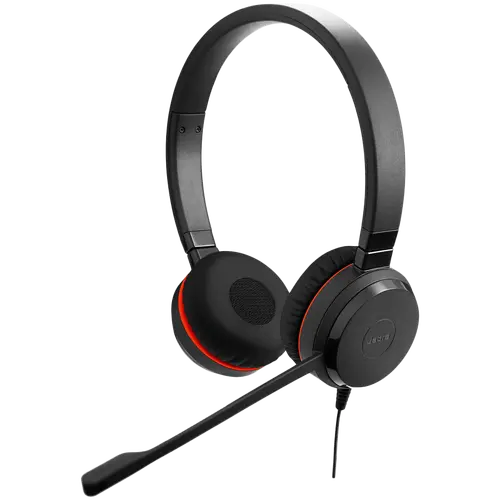
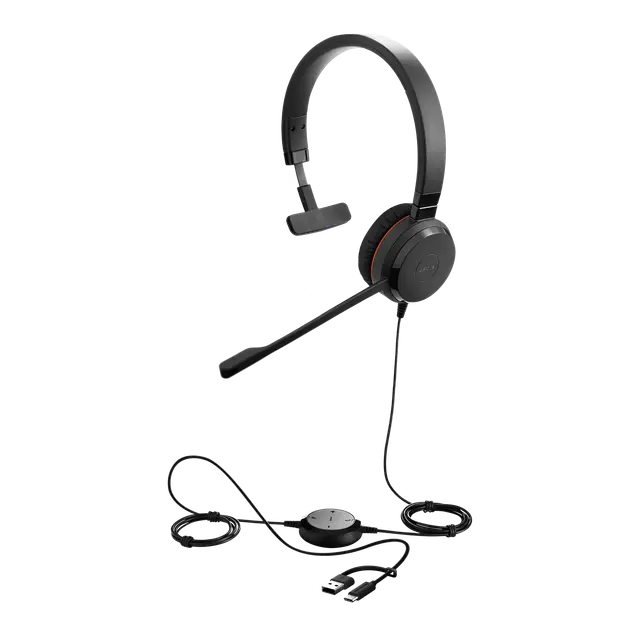
The Jabra Evolve 30 II Stereo is a wired on-ear headset built for calls, online meetings and music. It connects by USB to a computer, or by 3.5mm jack to a phone or tablet. It suits office workers, call centre agents, remote teams and students attending online classes.
Key Features & Benefits
- Two ways to connect: Plug the USB controller into a laptop or PC. Alternatively, unplug the headset and use its 3.5mm jack with a smartphone or tablet. One headset covers your desk and your phone.
- In-line call control unit: Answer, end and mute calls, and adjust volume, without reaching for the mouse. LED indicators show call status, so you know when you’re muted.
- Uni-directional boom microphone: The mic focuses on your voice and picks up less sound from around you. As a result, colleagues and lecturers hear you clearly, even in a shared office or busy hostel room.
- Stereo sound for calls and music: Two 28mm speakers switch to a wider 20Hz–20kHz range for music and video. Therefore, it works for training videos and lectures, not only calls.
- Light, all-day design with hearing protection: The stereo headset weighs about 93g, with leatherette ear cushions. Additionally, Jabra PeakStop and SafeTone limit sudden loud sounds and long-term exposure during long call shifts.
Technical Specifications
Audio
- Speaker size: 28mm
- Speaker frequency range (calls): 150Hz – 7,000Hz (wideband voice)
- Speaker frequency range (music): 20Hz – 20,000Hz
- Speaker max input power: 10mW
- Sound mode: Stereo (both ears)
Microphone
- Type: Electret condenser (ECM), uni-directional boom microphone
- Sensitivity: -48dB to -44dB at 1kHz
- Benefit: Reduces pickup of background sound from the sides and behind
Connectivity
- Computer connection: USB via in-line controller (USB-A, USB-C or USB-C/A depending on version – see Important Notes)
- Mobile connection: 3.5mm jack (headset detaches from the USB controller)
- Setup: Plug-and-play – no driver needed on Windows or macOS
- Software: Jabra Direct (firmware updates and settings), Jabra Xpress (IT mass deployment)
Call Controls
- Control unit: In-line USB controller
- Functions: Answer/end call, mute, volume up/down
- Indicators: LED call status; busylight and Microsoft Teams notifications depend on the version
Hearing Protection
- Technologies: Jabra PeakStop, Jabra SafeTone, EU Noise at Work compliance, G616
Design & Comfort
- Wearing style: On-ear (supra-aural) headband
- Materials: Leatherette ear cushions, PC and PC/ABS plastic, stainless steel headband
- Colour: Black
Dimensions & Weight
- Headset dimensions: 170.4 x 151.2 x 59.5mm
- Headset weight: 93.2g (without cable); 138.2g with headset cable
- USB cable length: 2.15m total (controller plus headset cable) – enough slack to lean back from the desk
Environment
- Operating temperature: -10°C to 50°C
- Storage temperature: -30°C to 80°C
Platform Certification & Compatibility
- Certified/compatible with: Microsoft Teams (MS version), Zoom, Avaya, Alcatel-Lucent, Unify, and other leading UC platforms (UC version)
- Works with: Google Meet, Skype, Webex, WhatsApp calls and most softphones via standard USB audio
In the Box
- Jabra Evolve 30 II Stereo headset
- USB controller (call control unit)
- Travel pouch
- User documentation
Warranty
- Manufacturer warranty: 2 years (Jabra limited warranty)
Who Is the Jabra Evolve 30 II Stereo Ideal For?
Students
Online lectures, recorded tutorials and group calls on Zoom or Google Meet sound clearer with a boom mic. The stereo speakers also handle music and video between classes. Furthermore, the 3.5mm jack lets you take calls on your phone with the same headset.
Office and Business Use
Teams and Zoom calls are simpler with physical answer and mute buttons. The USB connection gives consistent audio quality across company laptops. In addition, IT teams can manage firmware across many headsets with Jabra Xpress.
Call Centres and Customer Service
Agents on long shifts benefit from the light weight and hearing protection. However, stereo blocks both ears. Agents who need to hear the room or supervisors may prefer the mono version.
Remote and Hybrid Workers
It plugs into a home laptop or an office PC without setup. The travel pouch protects it between home and office.
Will It Work With Your Setup?
Does the Jabra Evolve 30 II work with laptops that only have USB-C ports?
Yes, if you choose a USB-C or USB-C/A version. The USB-C/A version includes a connector that fits both port types. The older USB-A-only version needs a USB-C adapter on modern MacBooks and ultrabooks.
Does it work with smartphones and tablets?
Yes. Disconnect the headset from the USB controller and plug its 3.5mm jack into your phone or tablet. For phones without a headphone jack, use a USB-C to 3.5mm adapter. Note that the in-line call buttons are on the USB controller, so they won’t work in 3.5mm mode.
Does it work with Microsoft Teams, Zoom and Google Meet?
Yes. It works as a standard USB audio device with all three. The MS version is certified for Microsoft Teams. The UC version is optimised for other UC platforms such as Zoom, Avaya and Unify.
Does it work with Mac and Linux?
Yes. It is plug-and-play on macOS, Windows, ChromeOS and most Linux distributions. Jabra Direct software is available for Windows and macOS.
Does it have active noise cancellation (ANC)?
No. The speakers do not have ANC. The uni-directional microphone reduces background noise picked up during calls, but it won’t block out a noisy room for you. For speaker ANC, consider the Jabra Evolve2 40 SE or Evolve2 50.
Can I replace parts if they wear out?
Yes. Jabra sells replacement ear cushions, replacement stereo headsets (with 3.5mm jack) and replacement USB controllers. This extends the headset’s working life in busy offices.
How does it compare with the Jabra Evolve 20?
The Evolve 30 II adds a detachable 3.5mm jack for mobile use and a wider music-mode frequency range. The Evolve 20 is USB-only. As a result, the Evolve 30 II is the better choice if you also take calls on your phone.
Important Notes (for merchant verification before publishing)
- MS or UC version: Confirm which version this is. MS versions (SKU 5399-823-xxx) are Microsoft Teams certified. UC versions (SKU 5399-829-xxx) are optimised for other UC platforms. Update the certification lines to match.
- USB connector type: Confirm whether the unit is USB-A (-309), USB-C (-389) or USB-C/A (-389-01 / -369). Jabra is replacing the single-connector SKUs with USB-C/A versions during 2025. Edit the connectivity spec and FAQ to match.
- Busylight and Teams LED notifications: Jabra lists these as SKU dependent. Confirm on the unit before mentioning a busylight.
- Microphone noise cancellation: Jabra’s official tech sheet lists a uni-directional ECM microphone. It does not list a dedicated noise-cancelling microphone, so this description avoids that claim.
- Warranty: Jabra’s manufacturer warranty is 2 years. Confirm whether your distributor honours 2 years locally or offers a different term.
- Model suffix / full SKU: Confirm the full part number on the box for stock matching.
Available at Novelty Technologies Solutions







Reviews
There are no reviews yet.